
HomeTown Social™
v0.7.5 Development Brief
Badge System + Referral Engine + Admin Badge Management
Version: v0.7.5 Date: July 11, 2026 Base File: HometownSocial-v0_7_4.html Author: WBN News Corp™
Development Rules (Mandatory)
- Update version to v0.7.5 everywhere it appears
- Implement only what is in this brief
- Do not improvise
- Do not redesign UI
- Do not refactor existing features
- Do not change JSONBin sync
- Do not change posting
- Do not change comments
- Do not change public homepage
- Preserve all existing functionality
- Return the complete updated HTML file
- Never return partial patches or snippets
Overview
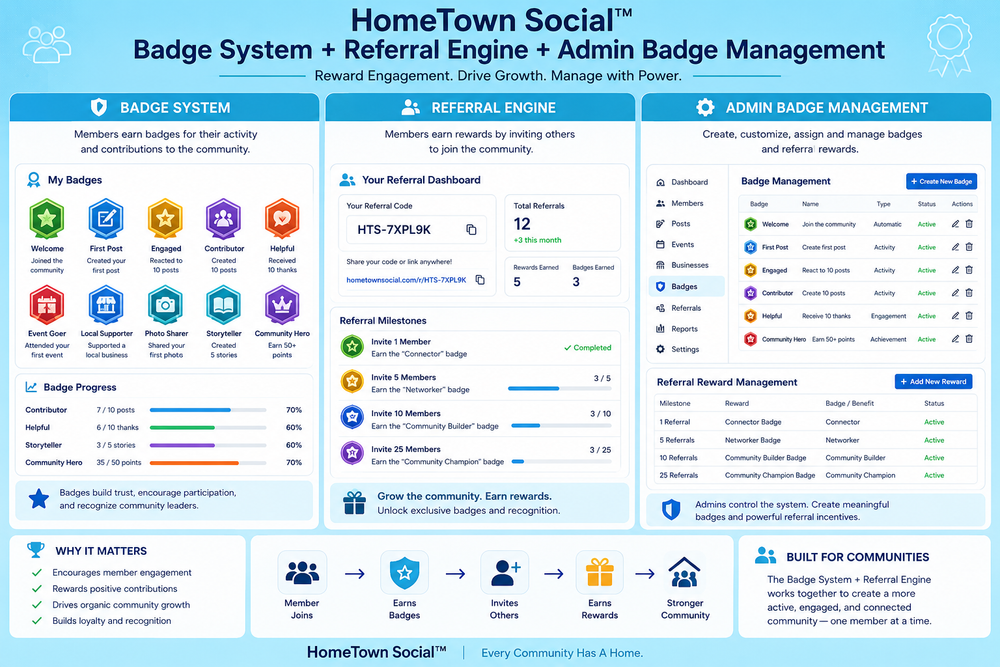
Build a complete member growth and recognition system into HomeTown Social™.
This is not a cosmetic feature. It is the primary organic growth engine for the network.
Three interconnected systems:
- Global Founder Badge — network-level scarcity badge
- Community Founder Badge — city-level founding cohort badge
- Referral Ladder — eleven tiers earned through inviting members
- Admin Badge Management — manual assignment and override
Strategic Context
Target milestones:
- 25 active members = Proof of Life. Feed looks alive. New visitors sign up.
- 150 members per community = Ignition. Self-sustaining. Community feeds itself.
- 500 members per community = Network Effect. FOMO kicks in. Revenue accelerates.
The badge system drives all three milestones:
- Global Founder scarcity creates urgency to join early
- Community Founder creates urgency to be first in each city
- Referral ladder incentivizes every member to recruit
- Admin badges allow manual recognition of key contributors
The math: 1,000 Global Founders × average 5 referrals = 5,000 members before any marketing spend.
System 1 — Global Founder Badge
Rule
First 1,000 members to join anywhere on the HomeTown Social™ network receive this badge permanently. After member #1,000 the badge closes forever.
Badge
🌍 Global Founder
Behaviour
- Counter stored in STATE as
STATE.globalMemberCount - Increment on every new member signup across the entire network
- If count is 1,000 or under at moment of signup — award badge automatically
- If count exceeds 1,000 — badge is permanently closed, no exceptions
- Badge stored on profile as
globalFounder: true - Badge travels with member identity across every community they join
- Cannot be removed by the member
- Can be manually awarded or removed by admin (see Admin Badge Management)
- Displayed permanently once earned
Display locations
- Beside member name on every post in the feed
- On their profile card in the People directory
- On their personal dashboard
- In Admin → Profiles member row
System 2 — Community Founder Badge
Rule
First 150 members to join each individual community receive this badge for that community permanently.
Badge
🏛️ Community Founder
Behaviour
- Each community tracks its own founding count independently
- Stored in STATE as
STATE.communityMemberCounts— one integer per community slug
javascript
STATE.communityMemberCounts = {
  'north-delta': 23,
  'ladner': 8,
  'tsawwassen': 4,
  'sunbury': 2,
  'vancouver': 0
}- When a new member signs up and selects a neighbourhood — increment that community's count
- If that community's count is 150 or under — award Community Founder badge for that community
- Badge is community-specific — a member can earn it in multiple communities
- Stored on profile as
communityFounder: ['north-delta', 'ladner'] - Cannot be removed by the member
- Can be manually awarded or removed by admin
Display locations
Same as Global Founder badge. Shows which community or communities they founded.
System 3 — Referral Ladder
The Eleven Tiers
| Referrals | Badge Name | Emoji |
|---|---|---|
| 1 | Community Starter | 🌱 |
| 5 | Connector | 🤝 |
| 10 | Neighbour | 🏘️ |
| 25 | Ambassador | ⭐ |
| 50 | Champion | 🏆 |
| 100 | Community Builder | 🔨 |
| 250 | Influencer | 📣 |
| 500 | Network Leader | 🌐 |
| 1,000 | City Maker | 🏙️ |
| 5,000 | Regional Legend | 🗺️ |
| 10,000 | HomeTown Legend | 👑 |
Referral Link
Every member gets a unique referral link generated automatically on signup.
Format:
[site-url]?ref=[handle]Example:
hometownsocial.mymidnight.blog/home-town-social/?ref=georgemoenReferral Capture Flow
- Visitor lands on the page with
?ref=georgemoenin the URL - App reads the ref parameter and stores it in
sessionStorageaspendingRef - Visitor creates an account
- On signup —
referredBy: 'georgemoen'is saved to the new member's profile - Referrer's
referralCountis incremented by 1 - Referral badge updates automatically to reflect new tier
- Both the referrer's profile and the new member's profile are updated and synced to JSONBin
Referral Badge Logic
- Current tier badge is the highest threshold the member has crossed
- Badge updates automatically — no manual action required
- Badge stored on profile as
referralBadge: 'neighbour' - Referral count stored on profile as
referralCount: 10
Privacy Controls
Member controls on their profile form:
Show who referred me
- Toggle on/off
- On:
Referred by @handlevisible on their public profile card - Off: Hidden from all public views, still stored internally
- Stored as
showReferredBy: true/false
Show my referral badge publicly
- Toggle on/off
- On: Referral badge and count visible on public profile
- Off: Badge hidden from public, still tracked internally
- Stored as
showReferralBadge: true/false
Member Dashboard — Referral Panel
Visible only to the signed-in member when viewing their own profile section. Not visible to other members or the public.
Layout
━━━━━━━━━━━━━━━━━━━━━━━━━━━━━━
YOUR REFERRAL LINK
hometownsocial.mymidnight.blog/home-town-social/?ref=georgemoen
[📋 Copy Link]
━━━━━━━━━━━━━━━━━━━━━━━━━━━━━━
YOUR BADGES
🌍 Global Founder
🏛️ Community Founder — North Delta
🏘️ Neighbour — 10 referrals
━━━━━━━━━━━━━━━━━━━━━━━━━━━━━━
PROGRESS TO NEXT BADGE
⭐ Ambassador — 25 referrals needed
████████████░░░░ 10 / 25
━━━━━━━━━━━━━━━━━━━━━━━━━━━━━━
PEOPLE YOU HAVE INVITED (10)
@joebloggs — North Delta — joined July 11
@sarahk — Ladner — joined July 10
@mikeb — Tsawwassen — joined July 9
━━━━━━━━━━━━━━━━━━━━━━━━━━━━━━
Behaviour
- Referral link is auto-generated from the member's handle and current page URL
- Copy Link button copies to clipboard and shows confirmation
- Progress bar shows current count vs next threshold
- If member has reached HomeTown Legend (10,000) — show congratulations, no next badge
- People You Have Invited list shows handle, neighbourhood, and join date
- List is sorted most recent first
- Empty state: "You have not invited anyone yet. Share your referral link to get started."
Badge Display on Posts
Each post in the member feed shows the member's earned badges beside their name.
Priority Order (left to right)
- 🌍 Global Founder — always show if earned
- 🏛️ Community Founder — always show if earned
- Referral badge — current tier only (highest earned)
- Admin-assigned custom badges — show after system badges
Example post header
[Avatar]  George Moen  🌍 🏛️ 🏘️
          @georgemoen · North Delta · 2 minutes ago
Rules
- Only show badges if
showReferralBadgeis true (or not set — default true) - Global Founder and Community Founder always show regardless of privacy setting
- Do not show all eleven referral tiers — only the current highest earned tier
- Keep it clean — maximum four badge emojis beside the name
Profile Card in People Directory
[Avatar]  George Moen                    🌍 🏛️ 🏘️
          @georgemoen
          North Delta
          Referred by: @joesmith  (only if showReferredBy is true)
Data Structures
STATE additions
javascript
STATE.globalMemberCount = 47
STATE.communityMemberCounts = {
  'north-delta': 23,
  'ladner': 8,
  'tsawwassen': 4,
  'sunbury': 2,
  'vancouver': 0
}
Member record additions (localStorage only — never in JSONBin)
javascript
{
  memberId: 'id_xxx',
  handle: 'georgemoen',
  referralCount: 10,
  referredBy: 'joesmith',
  showReferredBy: true,
  showReferralBadge: true
}
Profile record additions (JSONBin synced)
javascript
{
  globalFounder: true,
  communityFounder: ['north-delta'],
  referralBadge: 'neighbour',
  referralCount: 10,
  referredBy: 'joesmith',
  showReferredBy: true,
  showReferralBadge: true,
  adminBadges: [
    {
      emoji: '⭐',
      label: 'Special Recognition',
      assignedBy: 'admin',
      assignedAt: 1720694400000
    }
  ]
}
System 4 — Admin Badge Management
Location
Admin → Profiles → Manage (existing member detail panel)
Add a new section called Badge Management below the existing Admin Notes section.
What admin can do
- View all current badges on the member (earned + admin-assigned)
- Award any system badge manually
- Award a custom badge with custom emoji and label
- Remove any badge including system-earned ones
- All admin actions are logged with timestamp
Badge award panel UI
BADGE MANAGEMENT
━━━━━━━━━━━━━━━━━━━━━━━━━━━━━━
Current badges:
🌍 Global Founder [🔒 system]
🏛️ Community Founder — North Delta [🔒 system]
🏘️ Neighbour [🔒 earned — 10 referrals]
⭐ Special Recognition [🔒 admin — July 11 2026]  [Remove]

Award a badge:
[Select badge ▼]  [Award Badge]

Or award a custom badge:
Emoji: [  ]  Label: [              ]  [Award Custom Badge]
━━━━━━━━━━━━━━━━━━━━━━━━━━━━━━
Badge select dropdown options
🌍 Global Founder
🏛️ Community Founder
🌱 Community Starter
🤝 Connector
🏘️ Neighbour
⭐ Ambassador
🏆 Champion
🔨 Community Builder
📣 Influencer
🌐 Network Leader
🏙️ City Maker
🗺️ Regional Legend
👑 HomeTown Legend
Admin override rules
- Admin can award Global Founder even after the 1,000 limit is reached
- Admin can award Community Founder even after the 150 limit is reached
- Admin can remove any badge at any time
- Admin-assigned badges are marked with 🔒 in admin view only
- Members see the badge normally — they do not see the lock icon
- All admin badge changes sync to JSONBin immediately
Admin Profiles member row update
Each member row in the list now shows:
[Avatar]  George Moen  @georgemoen
          🌍 🏛️ 🏘️
          North Delta · 10 referrals · referred by @joesmith
          [View Profile]  [Manage]
Profile Form Additions
Add two new toggle fields to the existing profile form under a Privacy section addition:
Show who referred me
○ Yes — show @referrer on my profile
● No  — keep private

Show my referral badges publicly
● Yes — show badges on my profile and posts
○ No  — keep private
Both default to Yes.
Referral Ladder Constants
javascript
var REFERRAL_LADDER = [
  {count:1,     badge:'community-starter', label:'Community Starter', emoji:'🌱'},
  {count:5,     badge:'connector',         label:'Connector',         emoji:'🤝'},
  {count:10,    badge:'neighbour',         label:'Neighbour',         emoji:'🏘️'},
  {count:25,    badge:'ambassador',        label:'Ambassador',        emoji:'⭐'},
  {count:50,    badge:'champion',          label:'Champion',          emoji:'🏆'},
  {count:100,   badge:'community-builder', label:'Community Builder', emoji:'🔨'},
  {count:250,   badge:'influencer',        label:'Influencer',        emoji:'📣'},
  {count:500,   badge:'network-leader',    label:'Network Leader',    emoji:'🌐'},
  {count:1000,  badge:'city-maker',        label:'City Maker',        emoji:'🏙️'},
  {count:5000,  badge:'regional-legend',   label:'Regional Legend',   emoji:'🗺️'},
  {count:10000, badge:'hometown-legend',   label:'HomeTown Legend',   emoji:'👑'}
];

var GLOBAL_FOUNDER_LIMIT    = 1000;
var COMMUNITY_FOUNDER_LIMIT = 150;
Functions Required
getReferralBadge(count)
  — returns current badge object for a given referral count

getMemberBadges(profile)
  — returns array of all badges for display

renderBadgeString(profile)
  — returns HTML string of badge emojis for post/profile display

captureReferralCode()
  — reads ?ref= from URL, stores in sessionStorage

applyReferralOnSignup(newMemberHandle)
  — finds referrer, increments their count, updates their badge

awardAdminBadge(memberId, emoji, label)
  — adds to adminBadges array, saves, syncs

removeAdminBadge(memberId, index)
  — removes from adminBadges array, saves, syncs

renderReferralDashboard()
  — renders the full referral panel for the member's own profile view

renderAdminBadgePanel(memberId)
  — renders the badge management section in the admin manage panel
Acceptance Checklist
Before returning the file confirm all of the following:
- Version updated to v0.7.5 everywhere
- REFERRAL_LADDER constant defined
- GLOBAL_FOUNDER_LIMIT = 1000
- COMMUNITY_FOUNDER_LIMIT = 150
- STATE.globalMemberCount tracked
- STATE.communityMemberCounts tracked per slug
- ?ref= captured on page load and stored in sessionStorage
- referredBy saved to new member profile on signup
- Referrer's referralCount incremented on signup
- Referral badge updates automatically
- Global Founder badge awarded to first 1,000
- Community Founder badge awarded to first 150 per community
- Badges appear beside member name on posts
- Badges appear on profile cards in People directory
- Referral dashboard visible to member on own profile
- Referral link auto-generated from handle + page URL
- Copy Link button works
- Progress bar shows current count vs next threshold
- People You Have Invited list renders correctly
- showReferredBy toggle works
- showReferralBadge toggle works
- Admin Badge Management panel added to Manage member detail
- Admin can award any system badge
- Admin can award custom badge with emoji and label
- Admin can remove any badge
- Admin-assigned badges marked with lock in admin view only
- Admin Profiles member row shows badges and referral info
- All badge data syncs to JSONBin via profile record
- No other features changed
- Complete HTML file returned
- JS syntax verified clean
Version Notes
This version does not change:
- JSONBin sync architecture
- Posting flow
- Comments
- Public homepage
- Admin panel design
- Login or PIN system
- Community structure
- Supabase integration
This version adds:
- Complete badge system
- Referral tracking
- Referral dashboard
- Admin badge management
- Badge display on posts and profiles
HomeTown Social™ v0.7.5 Development Brief WBN News Corp™ · hometownsocial.ca July 11, 2026